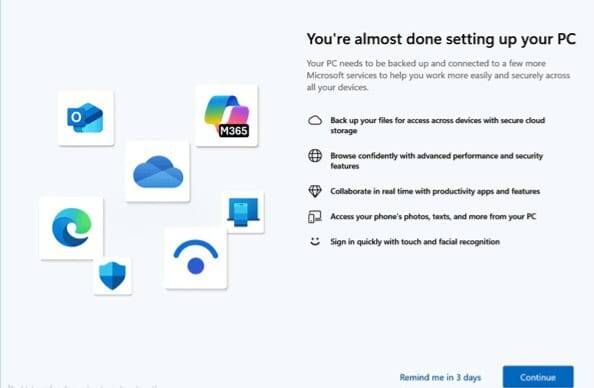
After a fresh installation or a major Windows 11 update, you may be greeted by a screen that says:
“Let’s finish setting up your device”
At first glance it looks like something important that still needs your attention. In reality, it’s mostly Microsoft encouraging you to connect additional services such as OneDrive, Microsoft 365, Phone Link, Windows Hello, and other ecosystem features.
For some users that’s useful. For others, it’s just another screen to dismiss every few weeks.
I’ve seen this prompt reappear after feature updates even on systems that were already fully configured, so if you’re wondering whether it’s safe to disable it, the short answer is yes.
Why Does Windows Keep Showing It?
Microsoft uses this experience to promote optional features and services that aren’t always enabled during the initial setup process.
The screen may suggest:
- Backing up files with OneDrive
- Activating Microsoft 365 features
- Connecting your phone to Windows
- Setting up Windows Hello
- Enabling additional Microsoft account integrations
Skipping these options doesn’t affect how Windows works, but the operating system may continue reminding you about them.
How to Disable It
The easiest method is through Windows Settings.
- Open Settings
- Go to System → Notifications
- Scroll down and expand Additional settings
- Disable the following options:
- Show the Windows welcome experience after updates
- Suggest ways to get the most out of Windows
- Get tips and suggestions when using Windows
After a restart, most users will no longer see the setup reminder.
Registry Method (Advanced)
If the notification still returns, you can disable the experience through the Windows Registry.
Navigate to:
HKEY_CURRENT_USER\Software\Microsoft\Windows\CurrentVersion\UserProfileEngagement
Find or create:
ScoobeSystemSettingEnabled
Set its value to:
0
Restart Windows when finished.
As always, create a registry backup before making changes.
Does Disabling It Break Anything?
No.
Disabling this screen does not:
- Stop Windows Updates
- Disable Microsoft Store
- Remove OneDrive
- Affect system security
- Reduce performance
It simply prevents Windows from repeatedly suggesting optional setup steps.
Final Thoughts
The “Let’s finish setting up your device” screen isn’t a warning or an error. It’s essentially a follow-up onboarding page designed to increase adoption of Microsoft’s services.
If you’ve already configured your PC the way you want, turning off these suggestions can make Windows feel a bit less intrusive.
Has this screen stopped appearing on your system, or does it keep coming back after major updates?