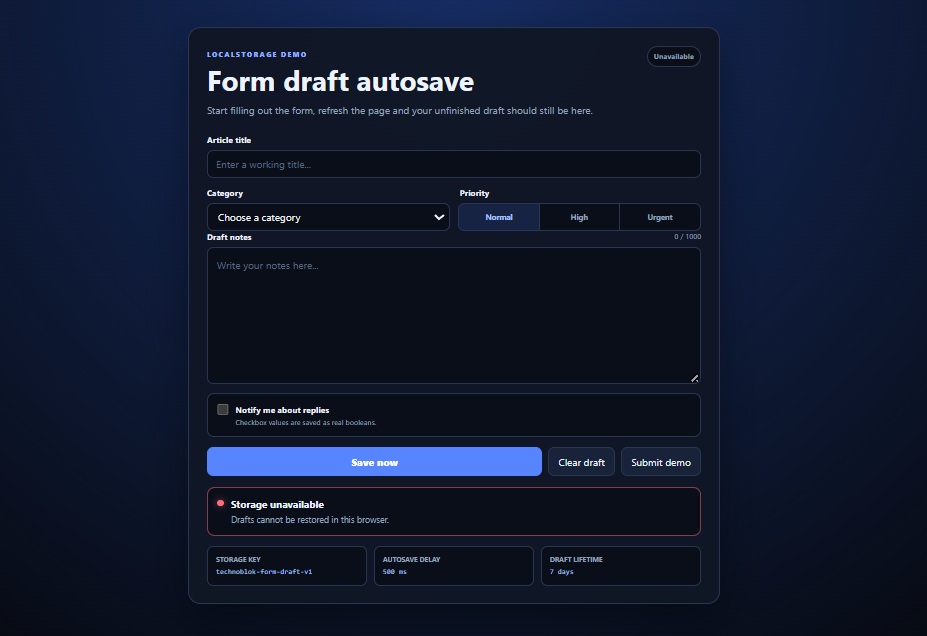
Nothing is more annoying than writing half a form, refreshing the page by accident and losing everything.
This example automatically saves text fields, select menus, radio buttons and checkboxes to localStorage. Open the page again and the unfinished draft is restored.
The draft is saved as one JSON object, expires after seven days and can stay synchronized between two open tabs. Writes are delayed slightly, so localStorage isn’t updated on every single keystroke.
No framework or server is required.
This is part of Copy, Run & Customize, a series of small projects you can open, change and use in your own work.
Copy the three blocks below, then open the TeknoFenomen Code Playground to run and edit it.
HTML
<main class="autosave-page">
  <section class="form-card">
    <header class="tool-header">
      <div>
        <span class="eyebrow">LOCALSTORAGE DEMO</span>
        <h1>Form draft autosave</h1>
        <p>
          Start filling out the form, refresh the page and your
          unfinished draft should still be here.
        </p>
      </div>

      <span id="storageState" class="storage-state">
        Not saved
      </span>
    </header>

    <form id="draftForm" novalidate>
      <label class="field full-width">
        <span>Article title</span>

        <input
          type="text"
          name="title"
          placeholder="Enter a working title..."
          autocomplete="off"
        >
      </label>

      <div class="field-grid">
        <label class="field">
          <span>Category</span>

          <select name="category">
            <option value="">Choose a category</option>
            <option value="development">Development</option>
            <option value="design">Design</option>
            <option value="hardware">Hardware</option>
            <option value="gaming">Gaming</option>
            <option value="artificial-intelligence">
              Artificial Intelligence
            </option>
          </select>
        </label>

        <fieldset class="priority-field">
          <legend>Priority</legend>

          <div class="radio-options">
            <label>
              <input
                type="radio"
                name="priority"
                value="normal"
                checked
              >
              <span>Normal</span>
            </label>

            <label>
              <input
                type="radio"
                name="priority"
                value="high"
              >
              <span>High</span>
            </label>

            <label>
              <input
                type="radio"
                name="priority"
                value="urgent"
              >
              <span>Urgent</span>
            </label>
          </div>
        </fieldset>
      </div>

      <label class="field full-width">
        <div class="field-heading">
          <span>Draft notes</span>
          <small id="noteCount">0 / 1000</small>
        </div>

        <textarea
          name="notes"
          maxlength="1000"
          placeholder="Write your notes here..."
        ></textarea>
      </label>

      <label class="checkbox-field">
        <input
          type="checkbox"
          name="notifications"
        >

        <span>
          <strong>Notify me about replies</strong>
          <small>
            Checkbox values are saved as real booleans.
          </small>
        </span>
      </label>

      <div class="form-actions">
        <button
          id="saveButton"
          class="primary-button"
          type="button"
        >
          Save now
        </button>

        <button id="clearButton" type="button">
          Clear draft
        </button>

        <button id="submitButton" type="submit">
          Submit demo
        </button>
      </div>
    </form>

    <div
      id="statusBox"
      class="status-box neutral"
      role="status"
      aria-live="polite"
    >
      <span class="status-dot"></span>

      <div>
        <strong id="statusTitle">Ready</strong>
        <p id="statusMessage">
          Changes will be saved automatically.
        </p>
      </div>
    </div>

    <div class="storage-details">
      <article>
        <span>Storage key</span>
        <code>technoblok-form-draft-v1</code>
      </article>

      <article>
        <span>Autosave delay</span>
        <code>500 ms</code>
      </article>

      <article>
        <span>Draft lifetime</span>
        <code>7 days</code>
      </article>
    </div>
  </section>
</main>
CSS
:root {
  color-scheme: dark;
  font-family:
    Inter, ui-sans-serif, system-ui, -apple-system,
    BlinkMacSystemFont, "Segoe UI", sans-serif;

  --background: #070a12;
  --panel: #101624;
  --panel-light: #182238;
  --input: #090e19;
  --border: #293653;
  --text: #edf3ff;
  --muted: #94a2bc;
  --accent: #5685ff;
  --accent-hover: #7299ff;
  --success: #44d994;
  --warning: #ffc963;
  --danger: #ff6d7d;
}

* {
  box-sizing: border-box;
}

body {
  min-height: 100vh;
  margin: 0;
  background:
    radial-gradient(circle at top, #162d64 0, transparent 42%),
    var(--background);
  color: var(--text);
}

button,
input,
select,
textarea {
  font: inherit;
}

button {
  padding: 10px 15px;
  border: 1px solid var(--border);
  border-radius: 10px;
  background: var(--panel-light);
  color: var(--text);
  cursor: pointer;
  transition:
    border-color 0.2s,
    background 0.2s,
    transform 0.15s;
}

button:hover {
  border-color: #52678e;
  background: #222f4b;
}

button:active {
  transform: translateY(1px);
}

button:focus-visible,
input:focus-visible,
select:focus-visible,
textarea:focus-visible {
  outline: 2px solid var(--accent);
  outline-offset: 2px;
}

.autosave-page {
  width: min(850px, calc(100% - 30px));
  margin: 0 auto;
  padding: 50px 0;
}

.form-card {
  padding: 28px;
  border: 1px solid var(--border);
  border-radius: 20px;
  background: rgba(16, 22, 36, 0.96);
  box-shadow: 0 25px 70px rgba(0, 0, 0, 0.38);
}

.tool-header {
  display: flex;
  align-items: flex-start;
  justify-content: space-between;
  gap: 22px;
  margin-bottom: 25px;
}

.tool-header > div {
  max-width: 650px;
}

.eyebrow {
  color: #8cacff;
  font-size: 0.72rem;
  font-weight: 800;
  letter-spacing: 0.16em;
}

h1 {
  margin: 8px 0 10px;
  font-size: clamp(1.8rem, 6vw, 2.8rem);
  line-height: 1.1;
}

.tool-header p {
  margin: 0;
  color: var(--muted);
  line-height: 1.65;
}

.storage-state {
  flex: 0 0 auto;
  padding: 7px 10px;
  border: 1px solid var(--border);
  border-radius: 20px;
  background: var(--input);
  color: var(--muted);
  font-size: 0.73rem;
  font-weight: 750;
}

.storage-state.saving {
  border-color: rgba(255, 201, 99, 0.45);
  color: var(--warning);
}

.storage-state.saved {
  border-color: rgba(68, 217, 148, 0.45);
  color: var(--success);
}

.field-grid {
  display: grid;
  grid-template-columns: repeat(2, minmax(0, 1fr));
  gap: 14px;
  margin-top: 14px;
}

.field {
  display: flex;
  min-width: 0;
  flex-direction: column;
  gap: 8px;
}

.field.full-width + .field.full-width {
  margin-top: 14px;
}

.field > span,
.field-heading > span,
.priority-field legend {
  font-size: 0.84rem;
  font-weight: 700;
}

.field-heading {
  display: flex;
  align-items: center;
  justify-content: space-between;
  gap: 15px;
}

.field-heading small {
  color: var(--muted);
  font-size: 0.73rem;
}

input[type="text"],
select,
textarea {
  width: 100%;
  min-width: 0;
  border: 1px solid var(--border);
  border-radius: 10px;
  outline: 0;
  background: var(--input);
  color: var(--text);
}

input[type="text"],
select {
  height: 45px;
  padding: 0 13px;
}

textarea {
  min-height: 220px;
  resize: vertical;
  padding: 14px;
  line-height: 1.6;
}

input[type="text"]:focus,
select:focus,
textarea:focus {
  border-color: var(--accent);
}

input::placeholder,
textarea::placeholder {
  color: #586781;
}

.priority-field {
  min-width: 0;
  margin: 0;
  padding: 0;
  border: 0;
}

.priority-field legend {
  margin-bottom: 8px;
}

.radio-options {
  display: grid;
  height: 45px;
  grid-template-columns: repeat(3, 1fr);
  overflow: hidden;
  border: 1px solid var(--border);
  border-radius: 10px;
  background: var(--input);
}

.radio-options label {
  position: relative;
  display: grid;
  place-items: center;
  border-right: 1px solid var(--border);
  cursor: pointer;
}

.radio-options label:last-child {
  border-right: 0;
}

.radio-options input {
  position: absolute;
  opacity: 0;
  pointer-events: none;
}

.radio-options span {
  display: grid;
  width: 100%;
  height: 100%;
  place-items: center;
  color: var(--muted);
  font-size: 0.76rem;
  font-weight: 700;
}

.radio-options input:checked + span {
  background: rgba(86, 133, 255, 0.18);
  color: #a9c0ff;
}

.radio-options input:focus-visible + span {
  outline: 2px solid var(--accent);
  outline-offset: -3px;
}

.checkbox-field {
  display: flex;
  align-items: flex-start;
  gap: 11px;
  margin-top: 14px;
  padding: 15px;
  border: 1px solid var(--border);
  border-radius: 11px;
  background: var(--input);
  cursor: pointer;
}

.checkbox-field input {
  width: 18px;
  height: 18px;
  flex: 0 0 auto;
  margin: 1px 0 0;
  accent-color: var(--accent);
}

.checkbox-field > span {
  display: flex;
  flex-direction: column;
  gap: 4px;
}

.checkbox-field strong {
  font-size: 0.84rem;
}

.checkbox-field small {
  color: var(--muted);
  font-size: 0.73rem;
}

.form-actions {
  display: flex;
  flex-wrap: wrap;
  gap: 9px;
  margin-top: 16px;
}

.primary-button {
  flex: 1;
  min-width: 145px;
  border-color: var(--accent);
  background: var(--accent);
  color: white;
  font-weight: 800;
}

.primary-button:hover {
  border-color: var(--accent-hover);
  background: var(--accent-hover);
}

.status-box {
  display: flex;
  align-items: flex-start;
  gap: 12px;
  margin-top: 18px;
  padding: 14px 15px;
  border: 1px solid var(--border);
  border-radius: 12px;
  background: var(--input);
}

.status-dot {
  flex: 0 0 auto;
  width: 10px;
  height: 10px;
  margin-top: 5px;
  border-radius: 50%;
  background: var(--muted);
}

.status-box strong {
  display: block;
  margin-bottom: 3px;
}

.status-box p {
  margin: 0;
  color: var(--muted);
  font-size: 0.87rem;
  line-height: 1.5;
}

.status-box.saving {
  border-color: rgba(255, 201, 99, 0.45);
}

.status-box.saving .status-dot {
  background: var(--warning);
  box-shadow: 0 0 12px rgba(255, 201, 99, 0.55);
  animation: pulse 1s infinite;
}

.status-box.success {
  border-color: rgba(68, 217, 148, 0.45);
}

.status-box.success .status-dot {
  background: var(--success);
  box-shadow: 0 0 12px rgba(68, 217, 148, 0.6);
}

.status-box.error {
  border-color: rgba(255, 109, 125, 0.5);
}

.status-box.error .status-dot {
  background: var(--danger);
  box-shadow: 0 0 12px rgba(255, 109, 125, 0.55);
}

@keyframes pulse {
  50% {
    opacity: 0.35;
  }
}

.storage-details {
  display: grid;
  grid-template-columns: repeat(3, 1fr);
  gap: 10px;
  margin-top: 16px;
}

.storage-details article {
  min-width: 0;
  padding: 13px;
  border: 1px solid var(--border);
  border-radius: 10px;
  background: var(--input);
}

.storage-details span {
  display: block;
  margin-bottom: 6px;
  color: var(--muted);
  font-size: 0.68rem;
  font-weight: 700;
  text-transform: uppercase;
}

.storage-details code {
  display: block;
  overflow: hidden;
  color: #a9c0ff;
  font-family:
    "SFMono-Regular", Consolas, "Liberation Mono", monospace;
  font-size: 0.73rem;
  text-overflow: ellipsis;
  white-space: nowrap;
}

@media (max-width: 650px) {
  .autosave-page {
    width: min(100% - 20px, 850px);
    padding: 20px 0;
  }

  .form-card {
    padding: 18px;
  }

  .tool-header {
    flex-direction: column;
  }

  .field-grid,
  .storage-details {
    grid-template-columns: 1fr;
  }
}

@media (max-width: 430px) {
  .form-actions {
    display: grid;
    grid-template-columns: 1fr 1fr;
  }

  .primary-button {
    grid-column: 1 / -1;
  }
}
JavaScript
const STORAGE_KEY = "technoblok-form-draft-v1";
const STORAGE_VERSION = 1;
const AUTOSAVE_DELAY = 500;
const DRAFT_LIFETIME =
  7 * 24 * 60 * 60 * 1000;

const form = document.querySelector("#draftForm");
const saveButton = document.querySelector("#saveButton");
const clearButton = document.querySelector("#clearButton");

const notesField = form.elements.namedItem("notes");
const noteCount = document.querySelector("#noteCount");
const storageState = document.querySelector("#storageState");

const statusBox = document.querySelector("#statusBox");
const statusTitle = document.querySelector("#statusTitle");
const statusMessage = document.querySelector("#statusMessage");

let autosaveTimer = null;

function setStatus(type, title, message) {
  statusBox.className = `status-box ${type}`;
  statusTitle.textContent = title;
  statusMessage.textContent = message;
}

function setStorageState(text, type = "") {
  storageState.textContent = text;
  storageState.className = `storage-state ${type}`;
}

function storageIsAvailable() {
  const testKey = `${STORAGE_KEY}-test`;

  try {
    localStorage.setItem(testKey, "1");
    localStorage.removeItem(testKey);

    return true;
  } catch {
    return false;
  }
}

function getFormData() {
  const data = {};

  Array.from(form.elements).forEach((field) => {
    if (
      !field.name ||
      field.disabled ||
      field.type === "button" ||
      field.type === "submit"
    ) {
      return;
    }

    if (field.type === "radio") {
      if (!(field.name in data)) {
        data[field.name] = null;
      }

      if (field.checked) {
        data[field.name] = field.value;
      }

      return;
    }

    if (field.type === "checkbox") {
      data[field.name] = field.checked;
      return;
    }

    data[field.name] = field.value;
  });

  return data;
}

function restoreFormData(data) {
  Object.entries(data).forEach(([name, value]) => {
    const matchingFields = Array.from(
      form.elements
    ).filter((field) => field.name === name);

    matchingFields.forEach((field) => {
      if (field.type === "radio") {
        field.checked = field.value === value;
        return;
      }

      if (field.type === "checkbox") {
        field.checked = Boolean(value);
        return;
      }

      field.value = value ?? "";
    });
  });

  updateNoteCount();
}

function getFormattedTime(timestamp) {
  return new Date(timestamp).toLocaleTimeString([], {
    hour: "2-digit",
    minute: "2-digit",
    second: "2-digit"
  });
}

function createPayload() {
  return {
    version: STORAGE_VERSION,
    savedAt: Date.now(),
    data: getFormData()
  };
}

function saveDraft(options = {}) {
  const { announce = true } = options;

  clearTimeout(autosaveTimer);
  autosaveTimer = null;

  if (!storageIsAvailable()) {
    setStorageState("Unavailable");

    setStatus(
      "error",
      "Storage unavailable",
      "Your browser blocked access to localStorage."
    );

    return false;
  }

  try {
    const payload = createPayload();

    localStorage.setItem(
      STORAGE_KEY,
      JSON.stringify(payload)
    );

    const savedTime = getFormattedTime(
      payload.savedAt
    );

    setStorageState("Saved", "saved");

    if (announce) {
      setStatus(
        "success",
        "Draft saved",
        `Last saved at ${savedTime}.`
      );
    }

    return true;
  } catch {
    setStorageState("Save failed");

    setStatus(
      "error",
      "Could not save the draft",
      "Browser storage may be full or unavailable."
    );

    return false;
  }
}

function scheduleAutosave() {
  clearTimeout(autosaveTimer);

  setStorageState("Saving…", "saving");

  setStatus(
    "saving",
    "Saving changes",
    "The draft will be updated after you stop typing."
  );

  autosaveTimer = setTimeout(() => {
    saveDraft();
  }, AUTOSAVE_DELAY);
}

function parseStoredPayload(rawValue) {
  const payload = JSON.parse(rawValue);

  if (
    !payload ||
    payload.version !== STORAGE_VERSION ||
    typeof payload.savedAt !== "number" ||
    typeof payload.data !== "object" ||
    payload.data === null
  ) {
    throw new Error("The saved draft has an invalid format.");
  }

  return payload;
}

function restoreDraft() {
  if (!storageIsAvailable()) {
    setStorageState("Unavailable");

    setStatus(
      "error",
      "Storage unavailable",
      "Drafts cannot be restored in this browser."
    );

    return;
  }

  const rawDraft = localStorage.getItem(
    STORAGE_KEY
  );

  if (!rawDraft) {
    setStorageState("Not saved");

    setStatus(
      "neutral",
      "No saved draft",
      "Start typing and the form will save automatically."
    );

    return;
  }

  try {
    const payload = parseStoredPayload(rawDraft);
    const draftAge = Date.now() - payload.savedAt;

    if (draftAge > DRAFT_LIFETIME) {
      localStorage.removeItem(STORAGE_KEY);

      setStorageState("Expired");

      setStatus(
        "neutral",
        "Old draft removed",
        "The saved draft was more than seven days old."
      );

      return;
    }

    restoreFormData(payload.data);

    setStorageState("Restored", "saved");

    setStatus(
      "success",
      "Draft restored",
      `Saved at ${getFormattedTime(payload.savedAt)}.`
    );
  } catch {
    localStorage.removeItem(STORAGE_KEY);

    setStorageState("Invalid draft");

    setStatus(
      "error",
      "Saved draft was invalid",
      "The damaged localStorage entry was removed."
    );
  }
}

function clearDraft() {
  clearTimeout(autosaveTimer);
  autosaveTimer = null;

  form.reset();
  updateNoteCount();

  try {
    localStorage.removeItem(STORAGE_KEY);

    setStorageState("Not saved");

    setStatus(
      "neutral",
      "Draft cleared",
      "The form and its saved local copy were removed."
    );
  } catch {
    setStatus(
      "error",
      "Could not clear the draft",
      "Your browser blocked access to localStorage."
    );
  }
}

function updateNoteCount() {
  const count = notesField.value.length;
  noteCount.textContent = `${count} / 1000`;
}

form.addEventListener("input", (event) => {
  if (event.target === notesField) {
    updateNoteCount();
  }

  scheduleAutosave();
});

form.addEventListener("change", scheduleAutosave);

form.addEventListener("submit", (event) => {
  event.preventDefault();

  clearTimeout(autosaveTimer);
  autosaveTimer = null;

  try {
    localStorage.removeItem(STORAGE_KEY);
  } catch {
    // The demo submission can still continue.
  }

  setStorageState("Submitted", "saved");

  setStatus(
    "success",
    "Demo submitted",
    "No data was sent anywhere. The saved draft was cleared."
  );
});

saveButton.addEventListener("click", () => {
  saveDraft();
});

clearButton.addEventListener("click", clearDraft);

window.addEventListener("storage", (event) => {
  if (event.key !== STORAGE_KEY) {
    return;
  }

  if (event.newValue === null) {
    form.reset();
    updateNoteCount();

    setStorageState("Cleared elsewhere");

    setStatus(
      "neutral",
      "Draft cleared in another tab",
      "This form was reset to match the other tab."
    );

    return;
  }

  try {
    const payload = parseStoredPayload(
      event.newValue
    );

    restoreFormData(payload.data);

    setStorageState("Updated", "saved");

    setStatus(
      "success",
      "Updated from another tab",
      `The newer draft from ${getFormattedTime(
        payload.savedAt
      )} was loaded.`
    );
  } catch {
    setStatus(
      "error",
      "Could not synchronize",
      "The draft from the other tab was invalid."
    );
  }
});

updateNoteCount();
restoreDraft();
Why use JSON.stringify()?
localStorage only stores strings. Passing an object directly produces an unhelpful value such as [object Object].
Convert the object into JSON before saving it:
const draft = {
  title: "My unfinished article",
  category: "development",
  notifications: true
};

localStorage.setItem(
  "article-draft",
  JSON.stringify(draft)
);
Parse it when loading:
const savedDraft = JSON.parse(
  localStorage.getItem("article-draft")
);
In a real project, always handle missing or invalid values because JSON.parse() throws an error when stored data is damaged.
Why delay the autosave?
Saving on every keystroke creates unnecessary storage writes:
input.addEventListener("input", saveDraft);
A small debounce waits until the user pauses typing:
let timer;

input.addEventListener("input", () => {
  clearTimeout(timer);

  timer = setTimeout(saveDraft, 500);
});
The user still gets fast autosaving, but rapid input is combined into a single write.
localStorage or sessionStorage?
localStorage normally remains available after closing and reopening the browser.
sessionStorage lasts for the current tab session and is removed when that tab is closed.
Both APIs store string values and use similar methods:
localStorage.setItem("key", "value");
localStorage.getItem("key");
localStorage.removeItem("key");
Don’t store sensitive information here
Data in localStorage can be read by JavaScript running on the same website. It is not an encrypted password vault.
Avoid storing:
- Passwords
- Payment card information
- Authentication tokens when safer cookie-based options exist
- Private medical or financial information
- Anything that would be dangerous if another script accessed it
Autosaved drafts, interface preferences, filters and non-sensitive settings are more appropriate uses.
Storage capacity also varies between browsers, so large files and images should not be placed in localStorage.