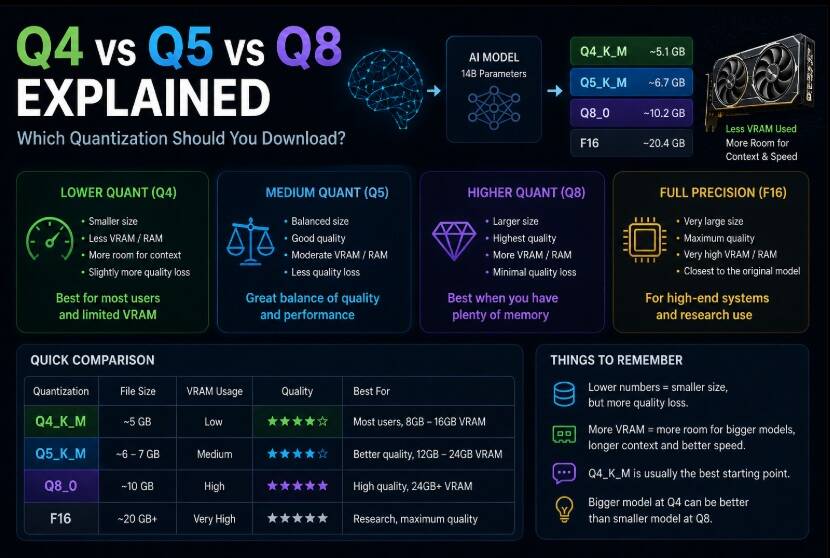
You find a model you want to run locally, open the download list, and suddenly you’re looking at this:
Q4_K_S
Q4_K_M
Q5_K_S
Q5_K_M
Q6_K
Q8_0
F16
Same model. Same parameter count. Completely different file sizes.
So which one are you supposed to download?
For most people, the answer is simpler than the names make it look.
Q4_K_M is usually the best place to start.
But that’s not always the right choice.
What is quantization?
AI models normally use relatively high-precision numbers to store billions of weights.
That makes them large.
Quantization reduces the precision used to represent those weights, allowing the same model to require less storage and memory.
Think of it as compression, although technically it isn’t the same thing as putting a file into a ZIP archive.
The model is changed into a more memory-efficient representation.
This means a model that would otherwise be far too large for a normal computer can become practical to run locally.
That’s one of the main reasons 7B, 14B, 32B and even much larger models can run on consumer hardware.
What does the number mean?
The easiest part is the number:
Q4
Q5
Q6
Q8
Very roughly, it represents the level of precision being used for the quantized weights.
Lower numbers generally mean:
- smaller files
- lower RAM and VRAM requirements
- potentially more quality loss
Higher numbers generally mean:
- larger files
- higher memory requirements
- better preservation of the original model
So:
Q4 → smaller
Q5 → larger
Q6 → larger again
Q8 → much larger
But that doesn’t mean Q8 is automatically the smartest download.
Why Q4 is so popular
Q4 sits in a very useful position.
It cuts model size dramatically while usually preserving enough quality that the model remains highly usable.
That’s why you’ll see Q4 versions of almost every popular GGUF model.
As a rough example, a model that might require around 14–16GB in a higher precision format could potentially become roughly 4–6GB when heavily quantized.
Exact sizes depend on the model and quantization method.
This makes Q4 particularly useful for:
- laptops
- 8GB GPUs
- 12GB GPUs
- running larger models on 16GB GPUs
- systems with limited RAM
- people who want good generation speed
The important part is that Q4 doesn’t mean the model suddenly becomes bad.
Modern quantization methods preserve a surprising amount of model quality.
Q4 vs Q5
This is probably the most useful comparison.
Suppose the same model is available as:
Q4_K_M
Q5_K_M
Q5 uses more precision.
That normally gives slightly better model fidelity, but the file is larger and requires more memory.
So you are essentially choosing between:
Q4
Smaller
Less memory
More room for context
Usually excellent quality
and:
Q5
Larger
More memory
Slightly better quality preservation
Less free VRAM/RAM
For everyday use, the difference in output quality may be much less noticeable than the difference in memory usage.
That’s why blindly choosing the highest quantization isn’t always useful.
Q8 sounds better. Should I just download Q8?
You can, if you have the memory.
Q8 keeps substantially more precision than Q4.
It also makes the model considerably larger.
For example, llama.cpp’s quantization documentation shows just how large the difference can become on the same model.
A 7B model in one older test was approximately:
Q4_0 → 3.5 GB
Q5_0 → 4.3 GB
Q8_0 → 6.7 GB
F16  → 13 GB
The exact numbers will differ with modern models and quantization formats, but the relationship is what matters:
Q8 can require almost twice as much space as Q4.
That extra memory doesn’t normally give you anything close to twice the quality.
So Q8 makes sense when you have plenty of memory and want to preserve as much model fidelity as possible.
It usually isn’t the best default for a memory-constrained system.
What is Q4_K_M?
This is where the names start looking unnecessarily complicated.
Let’s split it:
Q4_K_M
│  │ │
│  │ └─ variant
│  └── K-quant
└───── approximate quantization level
K refers to a newer family of block quantization methods used by llama.cpp.
The final letter commonly indicates the variant.
You’ll often encounter:
Q4_K_S
Q4_K_M
Q5_K_S
Q5_K_M
S generally represents a smaller variant.
M generally uses a mixed approach that preserves some tensors at higher precision.
As a result:
Q4_K_S
Smaller and slightly more aggressive.
Q4_K_M
A little larger, but usually a better quality compromise.
The same general idea applies to Q5_K variants.
Why Q4_K_M is often recommended
If someone has no idea which GGUF to download, Q4_K_M is a very sensible default.
It usually offers:
- relatively small model size
- reasonable RAM requirements
- reasonable VRAM requirements
- very good quality
- broad llama.cpp compatibility
- enough memory left for context
Most importantly, it avoids both extremes.
You’re not crushing the model down as aggressively as some tiny quantizations, but you’re also not consuming huge amounts of memory for relatively small quality gains.
When should you choose Q5_K_M?
Choose Q5_K_M when your model already fits comfortably into your hardware.
For example, imagine:
GPU: 16GB VRAM
Model Q4_K_M: 8GB
Model Q5_K_M: 10GB
If both fit comfortably and you still have enough memory for context and runtime overhead, Q5_K_M can make sense.
There’s little reason to aggressively save memory if you don’t need to.
But consider a different situation:
GPU: 12GB VRAM
Model Q4_K_M: 9GB
Model Q5_K_M: 11GB
Now the extra memory consumption matters much more.
The Q4 version leaves more room for context, cache and other GPU allocations.
In practice, Q4 could actually provide the better overall experience.
When should you choose Q8?
Q8 is useful when:
- memory isn’t a concern
- you’re running relatively small models
- you care about minimizing quantization loss
- you’re comparing model quality
- the model comfortably fits your hardware
For example, running an 8B model as Q8 on a machine with plenty of VRAM can be perfectly reasonable.
Running a huge model as Q8 just because Q8 has a bigger number usually isn’t.
You may get more value by running a larger model at Q4 or Q5.
Larger model at Q4 or smaller model at Q8?
This is where things get interesting.
Imagine you have enough memory for either:
14B model at Q8
or:
32B model at Q4
Which is better?
There is no universal answer, but parameter count and model architecture often matter much more than a relatively small difference in quantization quality.
A good 32B model at Q4 can easily be more capable than a smaller model preserved at very high precision.
So don’t choose models based only on quantization.
You need to consider both:
MODEL CAPABILITY
+
QUANTIZATION QUALITY
What about Q2 and Q3?
You’ll also encounter very small versions such as:
Q2_K
Q3_K_S
Q3_K_M
These are much more aggressively quantized.
Their biggest advantage is obvious:
They allow huge models to run on hardware that otherwise couldn’t load them.
That can be useful.
For example, maybe you don’t have enough RAM for a 70B Q4 model, but a smaller Q3 version fits.
At that point, Q3 may be better than not running the model at all.
But when you have enough memory for Q4, I’d generally start there instead.
What about Q6?
Q6 sits between Q5 and Q8.
It offers very good model fidelity while still providing meaningful size reduction compared with higher precision formats.
It’s a good option when you have plenty of memory but don’t necessarily need Q8.
You could think of the rough progression like this:
| Quantization | Memory use | Quality preservation | Typical use |
|---|---|---|---|
| Q2 | Very low | Lowest | Making huge models fit |
| Q3 | Low | Reduced | Very memory-limited systems |
| Q4 | Low–Medium | Very good | Best general starting point |
| Q5 | Medium | Excellent | More memory available |
| Q6 | Medium–High | Very high | Powerful systems |
| Q8 | High | Extremely high | Small models / lots of memory |
| F16/BF16 | Very high | Near original | High-memory hardware |
This isn’t a strict benchmark ranking.
Different models react differently to quantization.
Quantization doesn’t change the parameter count
This causes a lot of confusion.
If you download:
Qwen 14B Q4
you haven’t turned the model into a 4B model.
It’s still a 14-billion-parameter model.
The weights are simply represented using less precision.
Likewise:
32B Q4
is still a 32B model.
This is why quantization is so important for local AI.
You get access to the capability of a much larger model without needing the hardware that would be required to run its original high-precision weights.
File size isn’t the exact VRAM requirement
Another common mistake:
Model file = 10GB
GPU VRAM = 10GB

Therefore it fits.
Not necessarily.
The model itself isn’t the only thing consuming memory.
You also need room for things such as:
- KV cache
- context
- runtime buffers
- temporary allocations
- vision components
- other applications using the GPU
So leave some headroom.
A model that barely squeezes into your GPU can become unstable or start spilling into system memory as context grows.
Which quantization should you download?
Here’s the simple version.
Very limited memory
Try:
Q3_K_M
or Q4 if it fits.
Most users
Start with:
Q4_K_M
Plenty of RAM/VRAM
Try:
Q5_K_M
You want very high fidelity
Try:
Q6_K
or:
Q8_0
You’re trying to fit the largest possible model
You may need:
Q2
or:
Q3
but accept that you’re trading more model fidelity for size.
The rule I actually use
Don’t ask:
“What’s the highest quantization I can download?”
Ask:
“What’s the best model and quantization combination that fits comfortably?”
Those are very different questions.
If Q5 fits easily, use Q5.
If Q5 leaves you with almost no VRAM, use Q4.
If Q4 lets you move up to a substantially better model, the larger Q4 model may be the better choice.
If you’re simply starting out and don’t want to think about any of this yet:
Download Q4_K_M.
It’s not always the best option.
But it’s very rarely a bad place to start.
And once you’ve chosen the quantization, there’s another question waiting:
Why can a 20GB or 30GB model sometimes run on a GPU with only 16GB of VRAM?
That’s where GPU offloading comes in.