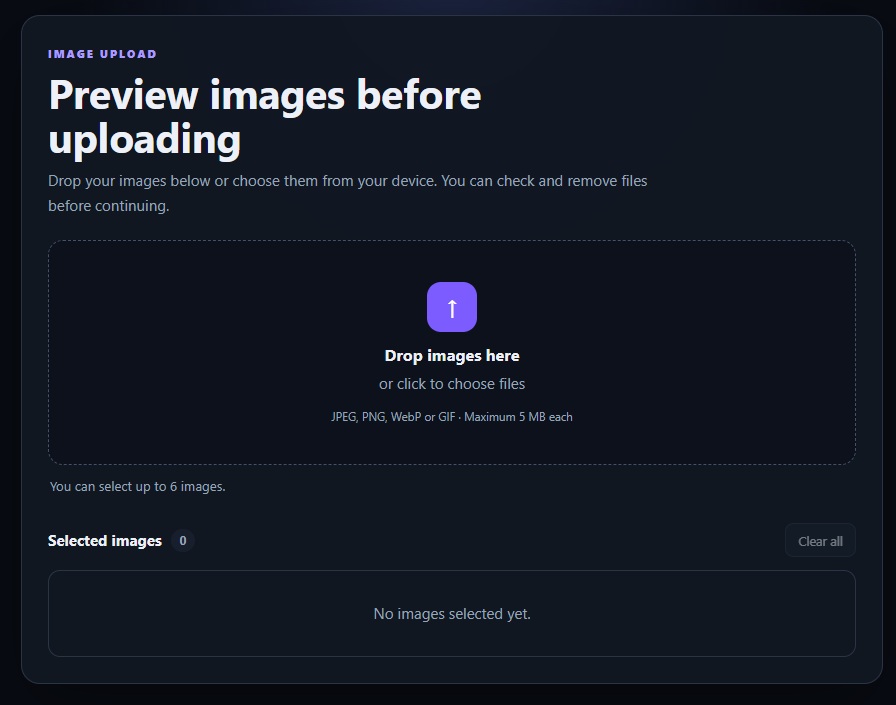
Need to show users which images they selected before they hit upload? This small component adds drag and drop, multiple image previews, file size checks and remove buttons using plain JavaScript.
No jQuery, no framework and nothing is uploaded while the preview is being created. The images stay inside the browser.
This is part of Copy, Run & Customize, a series of small projects you can open, change and use in your own work.
Most examples only handle one image or stop working once you try to remove a file. This one keeps the selected file list updated as well.
Copy the three blocks below, then open the TeknoFenomen Code Playground to run and edit it.
HTML
<main class="upload-page">
  <section class="upload-card">
    <header class="upload-header">
      <span class="eyebrow">IMAGE UPLOAD</span>
      <h1>Preview images before uploading</h1>
      <p>
        Drop your images below or choose them from your device.
        You can check and remove files before continuing.
      </p>
    </header>

    <label class="drop-zone" id="dropZone" for="fileInput">
      <input
        id="fileInput"
        type="file"
        accept="image/jpeg,image/png,image/webp,image/gif"
        multiple
      >

      <span class="upload-icon">↑</span>
      <strong>Drop images here</strong>
      <span>or click to choose files</span>

      <small>JPEG, PNG, WebP or GIF · Maximum 5 MB each</small>
    </label>

    <p class="status-message" id="statusMessage" role="status">
      You can select up to 6 images.
    </p>

    <section class="preview-section">
      <div class="preview-heading">
        <h2>
          Selected images
          <span id="fileCount">0</span>
        </h2>

        <button id="clearButton" type="button" disabled>
          Clear all
        </button>
      </div>

      <div class="preview-grid" id="previewGrid">
        <p class="empty-message">
          No images selected yet.
        </p>
      </div>
    </section>
  </section>
</main>
CSS
:root {
  color-scheme: dark;
  font-family:
    Inter, ui-sans-serif, system-ui, -apple-system,
    BlinkMacSystemFont, "Segoe UI", sans-serif;

  --background: #080b12;
  --panel: #111722;
  --panel-light: #171f2d;
  --border: #2a3445;
  --text: #edf1f7;
  --muted: #98a4b7;
  --accent: #7c5cff;
  --accent-light: #a99aff;
  --success: #45d692;
  --danger: #ff6d7c;
}

* {
  box-sizing: border-box;
}

body {
  min-height: 100vh;
  margin: 0;
  background:
    radial-gradient(circle at top, #1b2440 0, transparent 38%),
    var(--background);
  color: var(--text);
}

button,
input {
  font: inherit;
}

button {
  border: 1px solid var(--border);
  border-radius: 9px;
  background: var(--panel-light);
  color: var(--text);
  cursor: pointer;
}

button:hover:not(:disabled) {
  border-color: #57647a;
  background: #202a3b;
}

button:disabled {
  cursor: not-allowed;
  opacity: 0.45;
}

.upload-page {
  width: min(920px, calc(100% - 30px));
  margin: 0 auto;
  padding: 48px 0;
}

.upload-card {
  padding: 28px;
  border: 1px solid var(--border);
  border-radius: 20px;
  background: rgba(17, 23, 34, 0.95);
  box-shadow: 0 25px 70px rgba(0, 0, 0, 0.35);
}

.upload-header {
  max-width: 650px;
  margin-bottom: 24px;
}

.eyebrow {
  color: var(--accent-light);
  font-size: 0.75rem;
  font-weight: 800;
  letter-spacing: 0.16em;
}

h1 {
  margin: 8px 0 10px;
  font-size: clamp(1.8rem, 6vw, 2.7rem);
  line-height: 1.1;
}

.upload-header p {
  margin: 0;
  color: var(--muted);
  line-height: 1.65;
}

.drop-zone {
  display: flex;
  min-height: 240px;
  align-items: center;
  justify-content: center;
  flex-direction: column;
  gap: 8px;
  padding: 30px;
  border: 2px dashed #45516a;
  border-radius: 16px;
  background: #0c111b;
  text-align: center;
  cursor: pointer;
  transition:
    border-color 0.2s,
    background 0.2s,
    transform 0.2s;
}

.drop-zone:hover,
.drop-zone.dragging {
  border-color: var(--accent);
  background: rgba(124, 92, 255, 0.09);
}

.drop-zone.dragging {
  transform: scale(1.01);
}

.drop-zone input {
  position: absolute;
  width: 1px;
  height: 1px;
  overflow: hidden;
  opacity: 0;
  pointer-events: none;
}

.upload-icon {
  display: grid;
  width: 54px;
  height: 54px;
  place-items: center;
  margin-bottom: 5px;
  border-radius: 15px;
  background: var(--accent);
  color: white;
  font-size: 1.8rem;
  font-weight: 700;
}

.drop-zone strong {
  font-size: 1.08rem;
}

.drop-zone > span:not(.upload-icon),
.drop-zone small {
  color: var(--muted);
}

.drop-zone small {
  margin-top: 8px;
  font-size: 0.78rem;
}

.status-message {
  min-height: 24px;
  margin: 13px 2px 0;
  color: var(--muted);
  font-size: 0.88rem;
}

.status-message.success {
  color: var(--success);
}

.status-message.error {
  color: var(--danger);
}

.preview-section {
  margin-top: 25px;
}

.preview-heading {
  display: flex;
  align-items: center;
  justify-content: space-between;
  gap: 16px;
  margin-bottom: 13px;
}

.preview-heading h2 {
  margin: 0;
  font-size: 1rem;
}

.preview-heading h2 span {
  display: inline-grid;
  min-width: 25px;
  height: 25px;
  place-items: center;
  margin-left: 6px;
  border-radius: 20px;
  background: var(--panel-light);
  color: var(--muted);
  font-size: 0.78rem;
}

.preview-heading button {
  padding: 8px 13px;
  font-size: 0.84rem;
}

.preview-grid {
  display: grid;
  grid-template-columns: repeat(3, minmax(0, 1fr));
  gap: 14px;
}

.empty-message {
  grid-column: 1 / -1;
  margin: 0;
  padding: 35px;
  border: 1px solid var(--border);
  border-radius: 13px;
  color: var(--muted);
  text-align: center;
}

.preview-card {
  position: relative;
  overflow: hidden;
  border: 1px solid var(--border);
  border-radius: 13px;
  background: var(--panel-light);
}

.preview-card img {
  display: block;
  width: 100%;
  aspect-ratio: 4 / 3;
  background: #090d14;
  object-fit: cover;
}

.file-details {
  min-width: 0;
  padding: 11px 12px 13px;
}

.file-name {
  display: block;
  overflow: hidden;
  margin-bottom: 4px;
  font-size: 0.86rem;
  font-weight: 700;
  text-overflow: ellipsis;
  white-space: nowrap;
}

.file-size {
  color: var(--muted);
  font-size: 0.76rem;
}

.remove-button {
  position: absolute;
  top: 8px;
  right: 8px;
  display: grid;
  width: 31px;
  height: 31px;
  place-items: center;
  border-color: rgba(255, 255, 255, 0.25);
  border-radius: 50%;
  background: rgba(5, 8, 13, 0.8);
  color: white;
  font-size: 1.1rem;
  line-height: 1;
}

.remove-button:hover {
  border-color: var(--danger);
  background: var(--danger);
}

@media (max-width: 680px) {
  .upload-page {
    width: min(100% - 20px, 920px);
    padding: 20px 0;
  }

  .upload-card {
    padding: 18px;
  }

  .drop-zone {
    min-height: 210px;
    padding: 22px 15px;
  }

  .preview-grid {
    grid-template-columns: repeat(2, minmax(0, 1fr));
  }
}

@media (max-width: 420px) {
  .preview-grid {
    grid-template-columns: 1fr;
  }
}
JavaScript
const fileInput = document.querySelector("#fileInput");
const dropZone = document.querySelector("#dropZone");
const previewGrid = document.querySelector("#previewGrid");
const fileCount = document.querySelector("#fileCount");
const clearButton = document.querySelector("#clearButton");
const statusMessage = document.querySelector("#statusMessage");

const maximumFiles = 6;
const maximumFileSize = 5 * 1024 * 1024;

const allowedTypes = new Set([
  "image/jpeg",
  "image/png",
  "image/webp",
  "image/gif"
]);

let selectedFiles = [];
let previewUrls = [];
let dragDepth = 0;

function formatFileSize(bytes) {
  if (bytes < 1024) {
    return `${bytes} bytes`;
  }

  if (bytes < 1024 * 1024) {
    return `${(bytes / 1024).toFixed(1)} KB`;
  }

  return `${(bytes / (1024 * 1024)).toFixed(1)} MB`;
}

function getFileKey(file) {
  return `${file.name}-${file.size}-${file.lastModified}`;
}

function showStatus(message, type = "") {
  statusMessage.textContent = message;
  statusMessage.className = `status-message ${type}`;
}

function syncFileInput() {
  try {
    const transfer = new DataTransfer();

    selectedFiles.forEach((file) => {
      transfer.items.add(file);
    });

    fileInput.files = transfer.files;
  } catch {
    // Previewing still works in browsers that don't allow
    // the FileList to be changed from JavaScript.
  }
}

function releasePreviewUrls() {
  previewUrls.forEach((url) => {
    URL.revokeObjectURL(url);
  });

  previewUrls = [];
}

function removeFile(index) {
  const removedFile = selectedFiles[index];

  selectedFiles.splice(index, 1);
  syncFileInput();
  renderPreviews();

  showStatus(`${removedFile.name} was removed.`);
}

function createPreviewCard(file, index) {
  const card = document.createElement("article");
  card.className = "preview-card";

  const imageUrl = URL.createObjectURL(file);
  previewUrls.push(imageUrl);

  const image = document.createElement("img");
  image.src = imageUrl;
  image.alt = "";

  const details = document.createElement("div");
  details.className = "file-details";

  const name = document.createElement("span");
  name.className = "file-name";
  name.textContent = file.name;
  name.title = file.name;

  const size = document.createElement("span");
  size.className = "file-size";
  size.textContent = formatFileSize(file.size);

  const removeButton = document.createElement("button");
  removeButton.className = "remove-button";
  removeButton.type = "button";
  removeButton.textContent = "×";
  removeButton.setAttribute(
    "aria-label",
    `Remove ${file.name}`
  );

  removeButton.addEventListener("click", () => {
    removeFile(index);
  });

  details.append(name, size);
  card.append(image, details, removeButton);

  return card;
}

function renderPreviews() {
  releasePreviewUrls();
  previewGrid.innerHTML = "";

  fileCount.textContent = selectedFiles.length;
  clearButton.disabled = selectedFiles.length === 0;

  if (selectedFiles.length === 0) {
    const emptyMessage = document.createElement("p");
    emptyMessage.className = "empty-message";
    emptyMessage.textContent = "No images selected yet.";

    previewGrid.append(emptyMessage);
    return;
  }

  selectedFiles.forEach((file, index) => {
    previewGrid.append(createPreviewCard(file, index));
  });
}

function addFiles(fileList) {
  const incomingFiles = Array.from(fileList);
  const existingKeys = new Set(
    selectedFiles.map(getFileKey)
  );

  const rejected = [];

  for (const file of incomingFiles) {
    if (selectedFiles.length >= maximumFiles) {
      rejected.push("The 6 image limit was reached.");
      break;
    }

    if (!allowedTypes.has(file.type)) {
      rejected.push(`${file.name} isn't a supported image.`);
      continue;
    }

    if (file.size > maximumFileSize) {
      rejected.push(`${file.name} is larger than 5 MB.`);
      continue;
    }

    const key = getFileKey(file);

    if (existingKeys.has(key)) {
      rejected.push(`${file.name} is already selected.`);
      continue;
    }

    selectedFiles.push(file);
    existingKeys.add(key);
  }

  syncFileInput();
  renderPreviews();

  if (rejected.length > 0) {
    showStatus(rejected[0], "error");
    return;
  }

  const count = incomingFiles.length;
  showStatus(
    `${count} ${count === 1 ? "image" : "images"} added.`,
    "success"
  );
}

fileInput.addEventListener("change", (event) => {
  addFiles(event.target.files);
});

dropZone.addEventListener("dragenter", (event) => {
  event.preventDefault();
  dragDepth += 1;
  dropZone.classList.add("dragging");
});

dropZone.addEventListener("dragover", (event) => {
  event.preventDefault();
});

dropZone.addEventListener("dragleave", (event) => {
  event.preventDefault();
  dragDepth -= 1;

  if (dragDepth <= 0) {
    dragDepth = 0;
    dropZone.classList.remove("dragging");
  }
});

dropZone.addEventListener("drop", (event) => {
  event.preventDefault();

  dragDepth = 0;
  dropZone.classList.remove("dragging");

  addFiles(event.dataTransfer.files);
});

clearButton.addEventListener("click", () => {
  selectedFiles = [];
  syncFileInput();
  renderPreviews();

  showStatus("All selected images were removed.");
});

window.addEventListener("beforeunload", releasePreviewUrls);

renderPreviews();
How it works
Both clicking the drop area and dragging files into it send the selected images to the same JavaScript function.
Before adding a file, the code checks:
- Whether it is JPEG, PNG, WebP or GIF
- Whether it is smaller than 5 MB
- Whether the same file was already selected
- Whether the six-image limit has been reached
The previews are created with URL.createObjectURL(). These temporary browser URLs are released again when the list changes, so they don’t sit in memory longer than needed.
This example only handles the selection and preview part. It doesn’t upload anything to a server because the upload endpoint will be different for every project.
 Feature Recommendations for Improvement