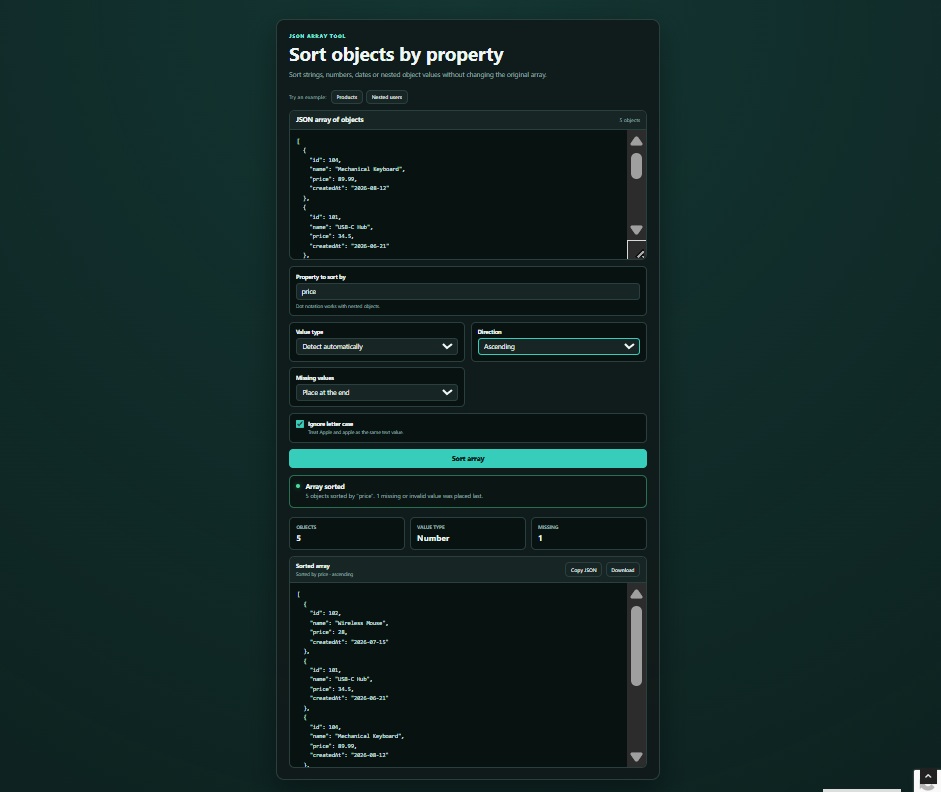
Sorting an array of objects looks simple until the values aren’t all the same type.
Names need string-aware sorting, prices should be compared as numbers and dates need to be converted into timestamps first. Real data may also contain missing values or nested properties such as profile.name.
This browser tool handles all of those cases. Paste a JSON array, enter the property you want to sort by and choose the direction. The original input stays unchanged.
You can also copy or download the sorted JSON. Everything runs locally in the browser.
This is part of Copy, Run & Customize, a series of small projects you can open, change and use in your own work.
Copy the three blocks below, then open the TeknoFenomen Code Playground to run and edit it.
HTML
<main class="sort-page">
  <section class="sort-card">
    <header class="tool-header">
      <span class="eyebrow">JSON ARRAY TOOL</span>
      <h1>Sort objects by property</h1>
      <p>
        Sort strings, numbers, dates or nested object values
        without changing the original array.
      </p>
    </header>

    <div class="example-actions">
      <span>Try an example:</span>

      <button id="productExampleButton" type="button">
        Products
      </button>

      <button id="userExampleButton" type="button">
        Nested users
      </button>
    </div>

    <div class="editor">
      <div class="editor-heading">
        <label for="jsonInput">JSON array of objects</label>
        <span id="inputCount">0 objects</span>
      </div>

      <textarea
        id="jsonInput"
        placeholder='[{"name":"Keyboard","price":79}]'
        spellcheck="false"
      ></textarea>
    </div>

    <div class="options-grid">
      <label class="control property-control">
        <span>Property to sort by</span>

        <input
          id="propertyInput"
          type="text"
          placeholder="price or profile.name"
          spellcheck="false"
        >

        <small>
          Dot notation works with nested objects.
        </small>
      </label>

      <label class="control">
        <span>Value type</span>

        <select id="typeSelect">
          <option value="auto">Detect automatically</option>
          <option value="text">Text</option>
          <option value="number">Number</option>
          <option value="date">Date</option>
        </select>
      </label>

      <label class="control">
        <span>Direction</span>

        <select id="directionSelect">
          <option value="ascending">Ascending</option>
          <option value="descending">Descending</option>
        </select>
      </label>

      <label class="control">
        <span>Missing values</span>

        <select id="missingSelect">
          <option value="last">Place at the end</option>
          <option value="first">Place at the beginning</option>
        </select>
      </label>

      <label class="check-control">
        <input id="caseCheckbox" type="checkbox" checked>

        <span>
          <strong>Ignore letter case</strong>
          <small>
            Treat Apple and apple as the same text value.
          </small>
        </span>
      </label>
    </div>

    <button id="sortButton" class="primary-button" type="button">
      Sort array
    </button>

    <div
      id="statusBox"
      class="status-box neutral"
      role="status"
      aria-live="polite"
    >
      <span class="status-dot"></span>

      <div>
        <strong id="statusTitle">Ready</strong>
        <p id="statusMessage">
          Paste a JSON object array or load an example.
        </p>
      </div>
    </div>

    <section id="resultSection" class="result-section" hidden>
      <div class="result-stats">
        <article>
          <span>Objects</span>
          <strong id="objectCount">0</strong>
        </article>

        <article>
          <span>Value type</span>
          <strong id="detectedType">—</strong>
        </article>

        <article>
          <span>Missing</span>
          <strong id="missingCount">0</strong>
        </article>
      </div>

      <div class="output-panel">
        <div class="output-heading">
          <div>
            <strong>Sorted array</strong>
            <span id="sortDescription">Valid JSON output</span>
          </div>

          <div class="output-actions">
            <button id="copyButton" type="button">
              Copy JSON
            </button>

            <button id="downloadButton" type="button">
              Download
            </button>
          </div>
        </div>

        <pre><code id="jsonOutput"></code></pre>
      </div>
    </section>
  </section>
</main>
CSS
:root {
  color-scheme: dark;
  font-family:
    Inter, ui-sans-serif, system-ui, -apple-system,
    BlinkMacSystemFont, "Segoe UI", sans-serif;

  --background: #07100f;
  --panel: #101a1a;
  --panel-light: #172524;
  --input: #081211;
  --border: #29403e;
  --text: #edf7f5;
  --muted: #92aaa6;
  --accent: #36cdbb;
  --accent-hover: #54ddcc;
  --success: #4bdd98;
  --danger: #ff707d;
}

* {
  box-sizing: border-box;
}

[hidden] {
  display: none !important;
}

body {
  min-height: 100vh;
  margin: 0;
  background:
    radial-gradient(circle at top, #143633 0, transparent 40%),
    var(--background);
  color: var(--text);
}

button,
textarea,
input,
select {
  font: inherit;
}

button {
  padding: 10px 15px;
  border: 1px solid var(--border);
  border-radius: 10px;
  background: var(--panel-light);
  color: var(--text);
  cursor: pointer;
  transition:
    border-color 0.2s,
    background 0.2s,
    transform 0.15s;
}

button:hover {
  border-color: #4e706c;
  background: #203230;
}

button:active {
  transform: translateY(1px);
}

button:focus-visible,
textarea:focus-visible,
input:focus-visible,
select:focus-visible {
  outline: 2px solid var(--accent);
  outline-offset: 2px;
}

.sort-page {
  width: min(920px, calc(100% - 30px));
  margin: 0 auto;
  padding: 50px 0;
}

.sort-card {
  padding: 28px;
  border: 1px solid var(--border);
  border-radius: 20px;
  background: rgba(16, 26, 26, 0.96);
  box-shadow: 0 25px 70px rgba(0, 0, 0, 0.38);
}

.tool-header {
  max-width: 690px;
  margin-bottom: 24px;
}

.eyebrow {
  color: #72e3d5;
  font-size: 0.72rem;
  font-weight: 800;
  letter-spacing: 0.16em;
}

h1 {
  margin: 8px 0 10px;
  font-size: clamp(1.8rem, 6vw, 2.8rem);
  line-height: 1.1;
}

.tool-header p {
  margin: 0;
  color: var(--muted);
  line-height: 1.65;
}

.example-actions {
  display: flex;
  align-items: center;
  flex-wrap: wrap;
  gap: 8px;
  margin-bottom: 13px;
}

.example-actions > span {
  margin-right: 3px;
  color: var(--muted);
  font-size: 0.82rem;
}

.example-actions button {
  padding: 7px 11px;
  font-size: 0.8rem;
}

.editor {
  overflow: hidden;
  border: 1px solid var(--border);
  border-radius: 14px;
  background: var(--input);
}

.editor:focus-within {
  border-color: var(--accent);
}

.editor-heading {
  display: flex;
  align-items: center;
  justify-content: space-between;
  gap: 15px;
  padding: 11px 14px;
  border-bottom: 1px solid var(--border);
  background: var(--panel-light);
}

.editor-heading label {
  font-weight: 700;
}

.editor-heading span {
  color: var(--muted);
  font-size: 0.78rem;
}

textarea {
  display: block;
  width: 100%;
  min-height: 310px;
  resize: vertical;
  padding: 16px;
  border: 0;
  outline: 0;
  background: transparent;
  color: #d9efeb;
  font-family:
    "SFMono-Regular", Consolas, "Liberation Mono", monospace;
  font-size: 0.87rem;
  line-height: 1.65;
  tab-size: 2;
}

textarea::placeholder,
input::placeholder {
  color: #58706c;
}

.options-grid {
  display: grid;
  grid-template-columns: repeat(2, minmax(0, 1fr));
  gap: 13px;
  margin-top: 15px;
}

.control {
  display: flex;
  min-width: 0;
  flex-direction: column;
  gap: 7px;
  padding: 14px;
  border: 1px solid var(--border);
  border-radius: 11px;
  background: var(--input);
}

.property-control {
  grid-column: 1 / -1;
}

.control > span {
  font-size: 0.83rem;
  font-weight: 700;
}

.control small,
.check-control small {
  color: var(--muted);
  font-size: 0.72rem;
  line-height: 1.4;
}

.control input,
.control select {
  width: 100%;
  min-width: 0;
  height: 40px;
  padding: 0 11px;
  border: 1px solid var(--border);
  border-radius: 8px;
  outline: 0;
  background: var(--panel-light);
  color: var(--text);
}

.control input:focus,
.control select:focus {
  border-color: var(--accent);
}

.check-control {
  display: flex;
  grid-column: 1 / -1;
  align-items: flex-start;
  gap: 10px;
  padding: 15px;
  border: 1px solid var(--border);
  border-radius: 11px;
  background: var(--input);
  cursor: pointer;
}

.check-control input {
  width: 18px;
  height: 18px;
  flex: 0 0 auto;
  margin: 1px 0 0;
  accent-color: var(--accent);
}

.check-control > span {
  display: flex;
  flex-direction: column;
  gap: 4px;
}

.check-control strong {
  font-size: 0.83rem;
}

.primary-button {
  width: 100%;
  margin-top: 15px;
  border-color: var(--accent);
  background: var(--accent);
  color: #03201c;
  font-weight: 800;
}

.primary-button:hover {
  border-color: var(--accent-hover);
  background: var(--accent-hover);
}

.status-box {
  display: flex;
  align-items: flex-start;
  gap: 12px;
  margin-top: 16px;
  padding: 14px 15px;
  border: 1px solid var(--border);
  border-radius: 12px;
  background: #0a1514;
}

.status-dot {
  flex: 0 0 auto;
  width: 10px;
  height: 10px;
  margin-top: 5px;
  border-radius: 50%;
  background: var(--muted);
}

.status-box strong {
  display: block;
  margin-bottom: 3px;
}

.status-box p {
  margin: 0;
  color: var(--muted);
  font-size: 0.88rem;
  line-height: 1.5;
}

.status-box.success {
  border-color: rgba(75, 221, 152, 0.45);
}

.status-box.success .status-dot {
  background: var(--success);
  box-shadow: 0 0 12px rgba(75, 221, 152, 0.6);
}

.status-box.error {
  border-color: rgba(255, 112, 125, 0.5);
}

.status-box.error .status-dot {
  background: var(--danger);
  box-shadow: 0 0 12px rgba(255, 112, 125, 0.55);
}

.result-section {
  margin-top: 22px;
}

.result-stats {
  display: grid;
  grid-template-columns: repeat(3, 1fr);
  gap: 11px;
}

.result-stats article {
  padding: 15px;
  border: 1px solid var(--border);
  border-radius: 11px;
  background: var(--input);
}

.result-stats span {
  display: block;
  margin-bottom: 5px;
  color: var(--muted);
  font-size: 0.72rem;
  font-weight: 700;
  text-transform: uppercase;
}

.result-stats strong {
  overflow-wrap: anywhere;
  font-size: 1.25rem;
  text-transform: capitalize;
}

.output-panel {
  overflow: hidden;
  margin-top: 13px;
  border: 1px solid var(--border);
  border-radius: 13px;
  background: var(--input);
}

.output-heading {
  display: flex;
  align-items: center;
  justify-content: space-between;
  gap: 15px;
  padding: 12px 14px;
  border-bottom: 1px solid var(--border);
  background: var(--panel-light);
}

.output-heading > div:first-child {
  display: flex;
  flex-direction: column;
  gap: 3px;
}

.output-heading strong {
  font-size: 0.87rem;
}

.output-heading span {
  color: var(--muted);
  font-size: 0.72rem;
}

.output-actions {
  display: flex;
  gap: 8px;
}

.output-actions button {
  padding: 8px 11px;
  font-size: 0.78rem;
}

pre {
  max-height: 440px;
  overflow: auto;
  margin: 0;
  padding: 17px;
}

pre code {
  color: #d9efeb;
  font-family:
    "SFMono-Regular", Consolas, "Liberation Mono", monospace;
  font-size: 0.86rem;
  line-height: 1.65;
}

@media (max-width: 650px) {
  .sort-page {
    width: min(100% - 20px, 920px);
    padding: 20px 0;
  }

  .sort-card {
    padding: 18px;
  }

  .options-grid {
    grid-template-columns: 1fr;
  }

  .property-control,
  .check-control {
    grid-column: auto;
  }
}

@media (max-width: 460px) {
  .result-stats {
    grid-template-columns: 1fr;
  }

  .output-heading {
    align-items: flex-start;
    flex-direction: column;
  }

  .output-actions {
    display: grid;
    width: 100%;
    grid-template-columns: 1fr 1fr;
  }
}
JavaScript
const jsonInput = document.querySelector("#jsonInput");
const propertyInput = document.querySelector("#propertyInput");
const typeSelect = document.querySelector("#typeSelect");
const directionSelect = document.querySelector("#directionSelect");
const missingSelect = document.querySelector("#missingSelect");
const caseCheckbox = document.querySelector("#caseCheckbox");

const sortButton = document.querySelector("#sortButton");
const productExampleButton = document.querySelector(
  "#productExampleButton"
);
const userExampleButton = document.querySelector(
  "#userExampleButton"
);

const inputCount = document.querySelector("#inputCount");
const statusBox = document.querySelector("#statusBox");
const statusTitle = document.querySelector("#statusTitle");
const statusMessage = document.querySelector("#statusMessage");

const resultSection = document.querySelector("#resultSection");
const objectCount = document.querySelector("#objectCount");
const detectedType = document.querySelector("#detectedType");
const missingCount = document.querySelector("#missingCount");
const sortDescription = document.querySelector(
  "#sortDescription"
);
const jsonOutput = document.querySelector("#jsonOutput");

const copyButton = document.querySelector("#copyButton");
const downloadButton = document.querySelector("#downloadButton");

const productExample = [
  {
    id: 104,
    name: "Mechanical Keyboard",
    price: 89.99,
    createdAt: "2026-08-12"
  },
  {
    id: 101,
    name: "USB-C Hub",
    price: 34.5,
    createdAt: "2026-06-21"
  },
  {
    id: 106,
    name: "Laptop Stand",
    price: null,
    createdAt: "2026-08-03"
  },
  {
    id: 102,
    name: "Wireless Mouse",
    price: 28,
    createdAt: "2026-07-15"
  },
  {
    id: 105,
    name: "Studio Monitor",
    price: 219,
    createdAt: "2026-05-09"
  }
];

const userExample = [
  {
    id: 8,
    profile: {
      name: "Zoe Carter",
      country: "Canada"
    }
  },
  {
    id: 2,
    profile: {
      name: "adam west",
      country: "United States"
    }
  },
  {
    id: 5,
    profile: {
      name: "Maria Silva",
      country: "Portugal"
    }
  },
  {
    id: 4,
    profile: {
      country: "Germany"
    }
  },
  {
    id: 7,
    profile: {
      name: "Akira Tanaka",
      country: "Japan"
    }
  }
];

let currentOutput = "";

function setStatus(type, title, message) {
  statusBox.className = `status-box ${type}`;
  statusTitle.textContent = title;
  statusMessage.textContent = message;
}

function updateInputCount() {
  try {
    const value = JSON.parse(jsonInput.value);

    if (!Array.isArray(value)) {
      inputCount.textContent = "Not an array";
      return;
    }

    inputCount.textContent =
      `${value.length} ${
        value.length === 1 ? "object" : "objects"
      }`;
  } catch {
    inputCount.textContent = "Invalid JSON";
  }
}

function isObject(value) {
  return (
    value !== null &&
    typeof value === "object" &&
    !Array.isArray(value)
  );
}

function isMissing(value) {
  return (
    value === undefined ||
    value === null ||
    value === ""
  );
}

function getNestedValue(object, propertyPath) {
  return propertyPath
    .split(".")
    .reduce((currentValue, property) => {
      if (!isObject(currentValue)) {
        return undefined;
      }

      return currentValue[property];
    }, object);
}

function detectType(values) {
  const availableValues = values.filter(
    (value) => !isMissing(value)
  );

  const allNumbers = availableValues.every((value) => {
    if (typeof value === "number") {
      return Number.isFinite(value);
    }

    return (
      typeof value === "string" &&
      value.trim() !== "" &&
      Number.isFinite(Number(value))
    );
  });

  if (allNumbers) {
    return "number";
  }

  const allDates = availableValues.every((value) => {
    return (
      typeof value === "string" &&
      !Number.isNaN(Date.parse(value))
    );
  });

  if (allDates) {
    return "date";
  }

  return "text";
}

function makeComparableValue(rawValue, valueType) {
  if (isMissing(rawValue)) {
    return {
      missing: true,
      value: null
    };
  }

  if (valueType === "number") {
    const numberValue = Number(rawValue);

    return {
      missing: !Number.isFinite(numberValue),
      value: numberValue
    };
  }

  if (valueType === "date") {
    const dateValue = Date.parse(rawValue);

    return {
      missing: Number.isNaN(dateValue),
      value: dateValue
    };
  }

  return {
    missing: false,
    value: String(rawValue)
  };
}

function compareText(firstValue, secondValue) {
  return firstValue.localeCompare(
    secondValue,
    undefined,
    {
      numeric: true,
      sensitivity: caseCheckbox.checked
        ? "base"
        : "variant"
    }
  );
}

function sortObjects(objects, propertyPath, valueType) {
  const decoratedObjects = objects.map(
    (object, index) => {
      const rawValue = getNestedValue(
        object,
        propertyPath
      );

      return {
        object,
        originalIndex: index,
        comparable: makeComparableValue(
          rawValue,
          valueType
        )
      };
    }
  );

  decoratedObjects.sort((first, second) => {
    const firstMissing = first.comparable.missing;
    const secondMissing = second.comparable.missing;

    if (firstMissing && secondMissing) {
      return first.originalIndex - second.originalIndex;
    }

    if (firstMissing) {
      return missingSelect.value === "first" ? -1 : 1;
    }

    if (secondMissing) {
      return missingSelect.value === "first" ? 1 : -1;
    }

    let comparison;

    if (valueType === "text") {
      comparison = compareText(
        first.comparable.value,
        second.comparable.value
      );
    } else {
      comparison =
        first.comparable.value -
        second.comparable.value;
    }

    if (comparison === 0) {
      return first.originalIndex - second.originalIndex;
    }

    return directionSelect.value === "descending"
      ? -comparison
      : comparison;
  });

  return decoratedObjects;
}

function sortArray() {
  try {
    if (!jsonInput.value.trim()) {
      throw new Error("Paste a JSON array first.");
    }

    const parsedValue = JSON.parse(jsonInput.value);

    if (!Array.isArray(parsedValue)) {
      throw new Error(
        "The input is valid JSON, but it is not an array."
      );
    }

    if (parsedValue.length === 0) {
      throw new Error("The array is empty.");
    }

    if (!parsedValue.every(isObject)) {
      throw new Error(
        "Every item in the array must be an object."
      );
    }

    const propertyPath = propertyInput.value.trim();

    if (!propertyPath) {
      throw new Error(
        "Enter the property you want to sort by."
      );
    }

    const rawValues = parsedValue.map((object) => {
      return getNestedValue(object, propertyPath);
    });

    if (rawValues.every(isMissing)) {
      throw new Error(
        `No values were found at "${propertyPath}".`
      );
    }

    const valueType =
      typeSelect.value === "auto"
        ? detectType(rawValues)
        : typeSelect.value;

    const sortedEntries = sortObjects(
      parsedValue,
      propertyPath,
      valueType
    );

    const missingTotal = sortedEntries.filter(
      (entry) => entry.comparable.missing
    ).length;

    if (missingTotal === parsedValue.length) {
      throw new Error(
        `None of the "${propertyPath}" values could be read as ${valueType}.`
      );
    }

    const sortedObjects = sortedEntries.map(
      (entry) => entry.object
    );

    currentOutput = JSON.stringify(
      sortedObjects,
      null,
      2
    );

    objectCount.textContent = parsedValue.length;
    detectedType.textContent = valueType;
    missingCount.textContent = missingTotal;
    jsonOutput.textContent = currentOutput;

    const directionLabel =
      directionSelect.value === "ascending"
        ? "ascending"
        : "descending";

    sortDescription.textContent =
      `Sorted by ${propertyPath} · ${directionLabel}`;

    resultSection.hidden = false;
    updateInputCount();

    let message =
      `${parsedValue.length} objects sorted by "${propertyPath}".`;

    if (missingTotal > 0) {
      message +=
        ` ${missingTotal} missing or invalid ${
          missingTotal === 1 ? "value was" : "values were"
        } placed ${missingSelect.value}.`;
    }

    setStatus(
      "success",
      "Array sorted",
      message
    );
  } catch (error) {
    resultSection.hidden = true;

    setStatus(
      "error",
      "Could not sort the array",
      error.message
    );
  }
}

function fallbackCopy(text) {
  const temporaryInput = document.createElement("textarea");

  temporaryInput.value = text;
  temporaryInput.setAttribute("readonly", "");
  temporaryInput.style.position = "fixed";
  temporaryInput.style.left = "-9999px";
  temporaryInput.style.opacity = "0";

  document.body.appendChild(temporaryInput);
  temporaryInput.select();

  const copied = document.execCommand("copy");

  temporaryInput.remove();

  return copied;
}

async function copyText(text) {
  if (navigator.clipboard && window.isSecureContext) {
    try {
      await navigator.clipboard.writeText(text);
      return true;
    } catch {
      return fallbackCopy(text);
    }
  }

  return fallbackCopy(text);
}

function showTemporaryButtonText(button, text) {
  const originalText = button.textContent;

  button.textContent = text;

  setTimeout(() => {
    button.textContent = originalText;
  }, 1500);
}

productExampleButton.addEventListener("click", () => {
  jsonInput.value = JSON.stringify(
    productExample,
    null,
    2
  );

  propertyInput.value = "price";
  typeSelect.value = "auto";
  directionSelect.value = "ascending";
  missingSelect.value = "last";

  sortArray();
});

userExampleButton.addEventListener("click", () => {
  jsonInput.value = JSON.stringify(
    userExample,
    null,
    2
  );

  propertyInput.value = "profile.name";
  typeSelect.value = "text";
  directionSelect.value = "ascending";
  missingSelect.value = "last";
  caseCheckbox.checked = true;

  sortArray();
});

sortButton.addEventListener("click", sortArray);

jsonInput.addEventListener("input", () => {
  updateInputCount();
  resultSection.hidden = true;

  setStatus(
    "neutral",
    "Not sorted yet",
    "Choose a property and sorting options."
  );
});

copyButton.addEventListener("click", async () => {
  const copied = await copyText(currentOutput);

  if (copied) {
    showTemporaryButtonText(copyButton, "Copied!");

    setStatus(
      "success",
      "JSON copied",
      "The sorted array is now in your clipboard."
    );
  } else {
    setStatus(
      "error",
      "Copy failed",
      "Your browser blocked clipboard access."
    );
  }
});

downloadButton.addEventListener("click", () => {
  const file = new Blob(
    [currentOutput],
    { type: "application/json" }
  );

  const fileUrl = URL.createObjectURL(file);
  const link = document.createElement("a");

  link.href = fileUrl;
  link.download = "sorted-array.json";

  document.body.appendChild(link);
  link.click();
  link.remove();

  setTimeout(() => {
    URL.revokeObjectURL(fileUrl);
  }, 0);

  showTemporaryButtonText(
    downloadButton,
    "Downloaded!"
  );
});

jsonInput.value = JSON.stringify(
  productExample,
  null,
  2
);

propertyInput.value = "price";
sortArray();
Sorting text properties
Use localeCompare() when sorting names and other human-readable text:
const users = [
  { name: "Zoe" },
  { name: "Adam" },
  { name: "Maria" }
];

const sortedUsers = [...users].sort((first, second) => {
  return first.name.localeCompare(second.name);
});
The spread operator creates a new array before sorting, so the original array isn’t rearranged.
For natural text sorting with numbers:
const sortedFiles = [...files].sort((first, second) => {
  return first.name.localeCompare(
    second.name,
    undefined,
    { numeric: true }
  );
});
This places file2 before file10.
Sorting numeric properties
Subtract the values when sorting numbers:
const lowToHigh = [...products].sort((first, second) => {
  return first.price - second.price;
});

const highToLow = [...products].sort((first, second) => {
  return second.price - first.price;
});
Using localeCompare() for prices would sort them as text, which can place 100 before 20.
Sorting date properties
Convert date strings into timestamps:
const newestFirst = [...posts].sort((first, second) => {
  return (
    new Date(second.createdAt).getTime() -
    new Date(first.createdAt).getTime()
  );
});
For data coming from an API, ISO 8601 dates such as 2026-08-29T12:30:00Z are much safer than ambiguous formats like 08/09/2026.
Sorting nested properties
A property may sit inside another object:
const users = [
  {
    profile: {
      name: "Maria"
    }
  }
];
A small helper can read paths such as profile.name:
function getNestedValue(object, path) {
  return path.split(".").reduce((value, property) => {
    return value?.[property];
  }, object);
}
Does sort() change the original array?
Yes. Array.prototype.sort() sorts the existing array in place.
Make a copy first:
const sorted = [...originalArray].sort(compareFunction);
Modern browsers also support toSorted(), which returns a new array:
const sorted = originalArray.toSorted(compareFunction);